
How to Check if a Laptop Is New, Used, or Refurbished in Nigeria
By Clarity Tech
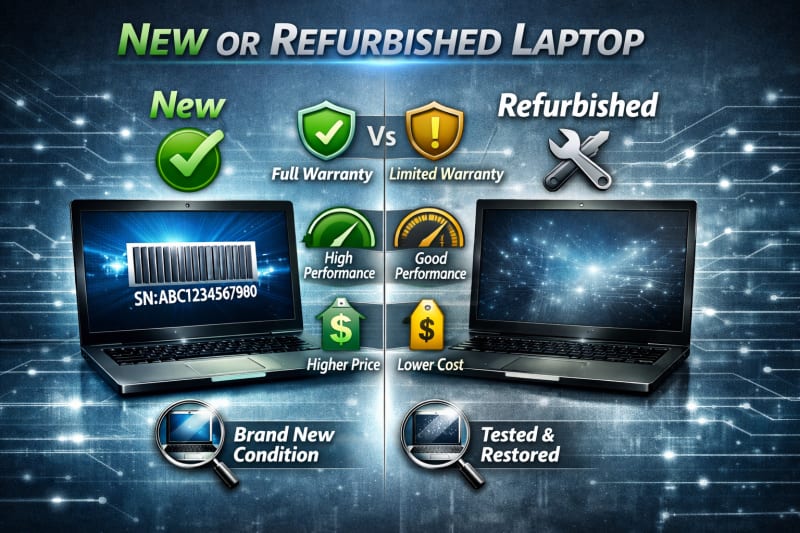
Buying a laptop requires more than checking its brand and appearance. One of the most important things to confirm before making payment is whether the laptop is actually new, previously used, or refurbished.
In Nigeria, buyers often come across different types of laptops, including brand-new devices, fairly used laptops, and refurbished models. While each category can provide value depending on the buyer's needs and budget, problems occur when sellers do not clearly disclose the true condition of a laptop.
A laptop advertised as “new” may have been previously used, repaired, or returned. Similarly, a refurbished laptop may be a good purchase when properly restored and sold honestly, but it should not be priced like a brand-new device.
This guide explains how to identify whether a laptop is new, used, or refurbished, the signs to look for, and the checks you should perform before buying a laptop in Nigeria.
Understanding New, Used, and Refurbished Laptops
Before buying a laptop, it is important to understand the difference between a new, used, and refurbished device. These terms describe the laptop's history, condition, and expected value. For those who want to verify their laptop's originality, read How to Verify Original Laptop in Nigeria Before Buying (Complete Guide).
Knowing the difference helps you avoid paying the wrong price or buying a device that does not meet your expectations.
1. What Is a New Laptop?
A new laptop is a device that has not been previously owned or used by another customer.
A genuine new laptop usually has:
- Original factory packaging
- Manufacturer seals (where applicable)
- Original accessories
- Full manufacturer warranty
- No previous user history
A new laptop should match the specifications provided by the manufacturer and seller.
2. What Is a Used Laptop?
A used laptop is a device that has previously been owned and operated by another person.
Used laptops may come from:
- Individual owners
- Businesses upgrading their computers
- Organisations replacing old equipment
The condition of a used laptop depends on:
- How long it was used
- How it was maintained
- Whether repairs were performed
- The environment where it was used
A well-maintained used laptop can still be a good purchase, especially for buyers with limited budgets.
3. What Is a Refurbished Laptop?
A refurbished laptop is a previously owned, returned, or repaired device that has been inspected, tested, and restored before being resold.
A proper refurbished laptop may have:
- Tested hardware components
- Replaced faulty parts
- Cleaned internal components
- Reinstalled operating system
- Quality checks before resale
Refurbished laptops are common because they provide a more affordable option compared to new devices.
4. Why the Difference Matters
The condition of a laptop affects:
- Price
- Warranty coverage
- Expected lifespan
- Performance expectations
For example, a refurbished laptop may offer excellent value at a lower price, but it should not be sold as a brand-new device.
Understanding these differences allows you to ask the right questions and make a better buying decision.
How to Identify a Brand-New Laptop Before Buying
A brand-new laptop should have clear signs that it has not been previously used. While appearance alone cannot always confirm a laptop's history, combining several checks can help you determine whether the device is genuinely new.
1. Check the Original Packaging
A new laptop should usually come with its original manufacturer packaging.
Look for:
- Properly sealed box
- Original product labels
- Matching serial number on the box and laptop
- Factory accessories
Be cautious if the packaging looks damaged, resealed, or different from the manufacturer's standard packaging.
2. Verify the Serial Number
The serial number should match across:
- Laptop label
- BIOS information
- Original packaging
You can also use the serial number on the manufacturer's official website to check product details and warranty information.
3. Check Warranty Status
A new laptop should generally have an unused or recently activated warranty period.
Be careful if:
- The warranty has already been running for a long time
- The laptop shows previous registration details
- The seller cannot explain the warranty status
A warranty check can provide clues about whether the laptop has been previously activated.
4. Inspect Physical Condition
A new laptop should have minimal signs of handling.
Check for:
- Scratches on the body
- Fingerprints or marks
- Worn keyboard keys
- Trackpad wear
- Dust around vents
Minor handling may occur during shipping or store display, but obvious wear requires explanation.
5. Check the Operating System Setup
A new laptop usually requires the first user setup process.
Be cautious if:
- A user account is already created
- Personal files exist
- Previous software or profiles are present
These may indicate that someone has used the laptop before.
6. Check Battery Usage
Battery information can provide clues about previous use.
A brand-new laptop should generally have very limited battery usage.
Check:
- Battery health
- Charge cycles
- Battery capacity
A laptop with significant battery wear may not be completely new.
7. Confirm With the Seller
Ask direct questions:
- Is this laptop brand new?
- Has it been opened before?
- Has it been used as a display unit?
- Is the warranty from the manufacturer?
A trustworthy seller should provide clear answers.
Identifying a new laptop requires checking several factors together.
No single sign can prove everything, but combining packaging, warranty, serial number, battery, and physical inspection gives you a much clearer picture of the laptop's history.
We recommend this HP ZBook Firefly 14 G11 Mobile Workstation | Intel Ultra 7. It is new and has great potential.
How to Identify a Used Laptop Before Buying
Buying a used laptop can be a smart way to get good performance at a lower price. However, it is important to know the laptop's true condition before paying. For a related article, explore How to Check Laptop Serial Number and Verify Authenticity in Nigeria(2026).
Some used laptops are well-maintained and reliable, while others may have hidden problems or require expensive repairs.
The following checks can help you identify whether a laptop has been previously used.
1. Inspect Physical Wear and Tear
A laptop that has been used for some time may show signs of regular handling.
Check for:
- Worn keyboard keys
- Scratches on the body
- Marks around the trackpad
- Loose hinges
- Damaged ports
- Worn palm rest area
The amount of wear can give you an idea of how heavily the laptop was used.
2. Check the Battery Condition
Laptop batteries lose capacity over time, making battery health an important indicator of usage.
Look for:
- Reduced battery life
- High charging cycle count
- Lower battery capacity compared to the original specification
A heavily worn battery may suggest that the laptop has been used extensively.
3. Check Storage Usage History
The storage drive can reveal information about previous usage.
You can check:
- Drive health
- Total operating hours
- Storage condition
A laptop with significant drive activity is likely not brand new. Unlike this HP EliteBook 840 G11 Core Ultra 7, you are laying your hands on a brand new operating system.
4. Look for Previous User Data
Check whether the laptop contains:
- Existing user accounts
- Personal files
- Installed applications
- Previous documents
A laptop with another person's data should be properly reset before purchase.
5. Check the Keyboard and Touchpad
Frequent use often leaves marks on input devices.
Pay attention to:
- Shiny or faded keys
- Unresponsive keys
- Touchpad wear
- Clicking issues
These signs can help estimate how much the laptop has been used.
6. Check the Charger and Accessories
Original accessories can also provide clues about the laptop's history.
Check:
- Charger condition
- Cable wear
- Adapter markings
- Compatibility with the laptop
A damaged or replacement charger may require further questions.
7. Ask About the Laptop's History
A responsible seller should be able to explain:
- Previous ownership
- Reason for sale
- Any repairs performed
- Replacement parts used
A seller who provides clear information is usually more trustworthy.
A used laptop is not necessarily a bad choice. Many fairly used laptops offer excellent value when properly inspected. The key is knowing the device's actual condition and ensuring the price matches its history.
How to Identify a Refurbished Laptop Before Buying
Refurbished laptops can provide excellent value because they are usually more affordable than new devices.
However, buyers need to understand what they are purchasing. A refurbished laptop should be clearly identified and properly tested, not presented as a brand-new device. This is another Ultra new laptop we recommend to you: Apple MacBook Air 11-inch.
Knowing the signs of a refurbished laptop helps you make a fair decision and avoid paying more than the device is worth.
1. Check for Refurbished Labels or Information
Some refurbished laptops are sold with clear markings indicating their condition.
Look for:
- Refurbished labels
- Seller descriptions
- Manufacturer refurbishment information
- Warranty details
A trustworthy seller should openly disclose that the laptop is refurbished.
2. Look for Signs of Repair or Replacement Parts
A refurbished laptop may contain replaced components.
Check for:
- Different-looking screws
- Signs that the laptop has been opened
- Replacement keyboard or trackpad
- Non-original accessories
These signs do not always mean the laptop is poor quality, but they show that it has had previous work done.
3. Check the Laptop's Physical Condition
Refurbished laptops often show some signs of previous use, even after restoration.
Inspect:
- Body scratches
- Keyboard condition
- Screen quality
- Hinges
- Ports
The condition should match the seller's description and price.
4. Verify Warranty Information
Many reputable refurbished laptops come with some form of warranty.
Check:
- Warranty length
- Who provides the warranty
- What parts are covered
A lack of warranty on a refurbished laptop may increase your risk.
5. Check Hardware Specifications
Some refurbished laptops may have upgraded or replaced components.
Verify:
- Processor model
- RAM size
- Storage type
- Battery condition
Make sure the actual specifications match what the seller advertises.
6. Check Operating System Installation
A refurbished laptop is often cleaned and reset before resale.
Be cautious if:
- Previous user accounts remain
- Personal files are still present
- The system has unusual software installed
A proper refurbishment process should include preparing the laptop for a new user.
7. Ask Why the Laptop Was Refurbished
A good seller should be able to explain the device's history.
Ask:
- Was it returned by a customer?
- Was any component replaced?
- Was it repaired?
- What tests were performed?
The more transparent the seller is, the more confidence you can have in the purchase.
A refurbished laptop can be a great option for buyers who want affordability, but the key is buying from a trustworthy seller and ensuring the device has been properly tested and honestly described.
How to Check Laptop Battery Health and Usage History
The battery is one of the best indicators of a laptop's previous usage. Since laptop batteries naturally lose capacity over time, checking battery health can help you determine whether a device is genuinely new, fairly used, or heavily used. We recommend reading this guide for a better understanding of getting an original laptop: How to Avoid Buying Fake or Stolen Laptops in Nigeria
A laptop with poor battery condition may require an expensive replacement soon after purchase.
1. Check Battery Report on Windows
Windows has a built-in tool that generates a detailed battery report.
Follow these steps:
- Open Command Prompt as administrator.
- Type:
- Press Enter.
- Windows will create a battery report file.
The report can show information such as:
- Original battery capacity
- Current battery capacity
- Battery usage history
- Charge cycles (depending on the device)
2. Compare Design Capacity and Full Charge Capacity
The battery report usually shows two important values:
Design Capacity: The original capacity of the battery when it was manufactured.
Full Charge Capacity: The amount of charge the battery can currently hold.
If the full charge capacity is significantly lower than the design capacity, the battery has experienced wear.
3. Check Battery Charging Behaviour
During testing, observe how the battery performs.
Pay attention to:
- How quickly the battery percentage drops
- Whether charging stops unexpectedly
- Whether the laptop shuts down suddenly
Poor battery behaviour may indicate an older or damaged battery.
4. Look for Battery Replacement Signs
A refurbished or repaired laptop may have a replacement battery.
Check:
- Battery model information
- Battery condition
- Whether the battery matches the laptop brand
A replacement battery is not necessarily a problem, but it should be disclosed by the seller.
5. Consider the Laptop's Age
Battery condition should be considered alongside the laptop's age.
For example:
- An older laptop with a reduced battery capacity may be normal.
- A supposedly brand-new laptop with significant battery wear requires further investigation.
6. Test Real-World Battery Performance
Specifications alone do not tell the full story. Test how long the laptop lasts during normal use.
Try:
- Browsing the internet
- Playing videos
- Opening applications
This gives you a practical idea of the battery condition.
Checking battery health is an important part of identifying a laptop's history. It helps you avoid buying a device that appears new but has already experienced heavy use.
How to Check if a Laptop Has Been Opened or Repaired
A laptop that has been opened or repaired is not automatically a bad purchase. Many quality used and refurbished laptops have had professional repairs or component replacements.
However, buyers should know the laptop's history before paying.
Checking for signs of opening or repairs can help you identify whether the laptop matches the seller's description.
1. Inspect the Screws and Bottom Cover
The screws underneath the laptop can reveal whether the device has been opened before.
Look for:
- Missing screws
- Damaged screw heads
- Scratches around screw areas
- Unevenly fitted bottom panels
A laptop that has been opened may have legitimate reasons, such as upgrading RAM or storage, but the seller should disclose major repairs.
2. Check the Laptop's Seams and Body Alignment
A factory-assembled laptop usually has properly aligned panels.
Be cautious if you notice:
- Gaps between panels
- Loose parts
- Uneven fitting
- Cracks around the edges
These may indicate that the laptop has been opened or repaired.
3. Inspect Internal Components (If Allowed)
If the seller permits inspection by a technician, check internal components such as:
- RAM modules
- Storage drive
- Battery
- Cooling system
Look for signs of replacement parts or unusual configurations.
4. Check for Replacement Parts
Some laptops may have parts replaced during repairs or refurbishment.
Common replacement components include:
- Battery
- Keyboard
- Screen
- Storage drive
- RAM
Replacement parts are not always negative, but they should be considered when evaluating the price and condition.
5. Check for Overheating Issues
Previous repairs may affect cooling performance if not done properly.
During testing, observe:
- Excessive fan noise
- High temperatures
- Sudden shutdowns
- Slow performance under load
These signs may indicate cooling or hardware problems.
6. Ask About Repair History
A trustworthy seller should be open about the laptop's history.
Ask:
- Has the laptop been repaired before?
- Which parts were replaced?
- Why was it repaired?
- Who performed the repair?
Clear answers help you make a more informed decision.
7. Get Professional Inspection for Expensive Laptops
For high-value laptops, consider having the device checked by an experienced technician before purchase.
A professional inspection can identify:
- Hidden repairs
- Non-original parts
- Hardware issues
A laptop that has been opened or repaired can still be a good purchase, but transparency is important. The key is knowing the laptop's true condition and ensuring the price reflects its history.
Questions to Ask a Seller Before Buying a Laptop
Asking the right questions before buying a laptop can help you discover important details about its condition, history, and authenticity. A trustworthy seller should be willing to provide clear answers and allow you to verify the information.
Before making payment, ask the following questions.