
Laptop Specifications You Need for Remote Work
By Clarity Tech
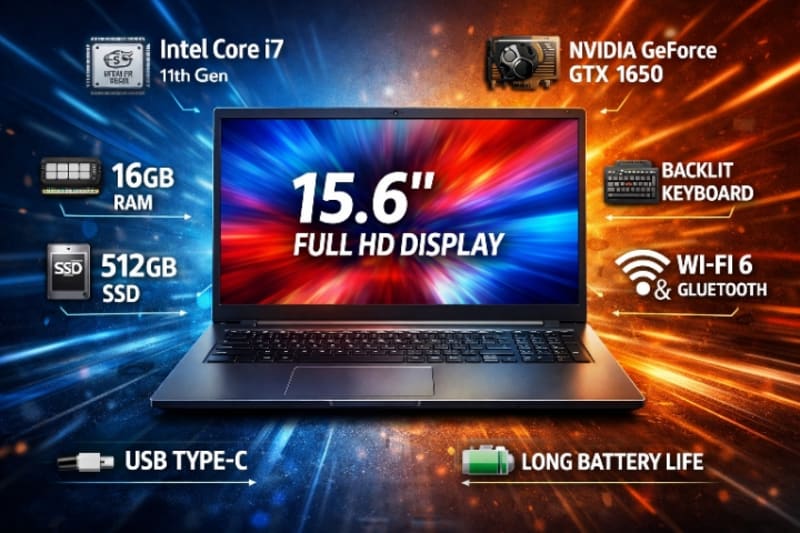
Buying a laptop for remote work can be confusing, especially when you're faced with technical specifications such as processors, RAM, SSDs, display resolutions, graphics cards, and battery capacities.
For many buyers, these terms are unfamiliar, making it difficult to know which specifications actually matter and which ones are simply marketing highlights.
The truth is that you don't need the most powerful laptop on the market to work effectively from home or while travelling. What you need is a laptop with specifications that match the type of work you do. Take for instance, this HP Envy 16-ac0033dx x360 2-in-1 Laptop, is a great product for remote job.
A virtual assistant who mainly uses email, spreadsheets, and video conferencing has very different hardware requirements from a software developer, graphic designer, or video editor. Buying too little power can leave you with a slow and frustrating computer, while buying far more than you need may result in unnecessary expense.
Understanding laptop specifications helps you make informed purchasing decisions and ensures your investment remains useful for years to come.
In this guide, we'll explain the most important laptop specifications for remote work, what each component does, the minimum requirements you should consider, and how to choose the right combination of hardware based on your workload and budget.
By the end, you'll know exactly which specifications deserve your attention and which ones you can safely ignore when shopping for your next remote work laptop.
The Brain of Your Laptop
The processor, commonly called the Central Processing Unit (CPU), is the component responsible for executing instructions and running the applications you use every day. It has a major influence on how fast your laptop performs, how smoothly it multitasks, and how responsive it feels during work.
For remote workers, choosing the right processor is one of the most important decisions you'll make.
What Does the Processor Do?
Every action you perform depends on the processor.
It is responsible for tasks such as:
- Opening applications.
- Running video meetings.
- Browsing the web.
- Editing documents.
- Processing spreadsheets.
- Compiling code.
- Rendering media files.
A more capable processor can complete these tasks faster and handle heavier workloads with greater ease.
Common Processor Options
Most modern laptops use processors from one of three families:
- Intel Core processors.
- AMD Ryzen processors.
- Apple M-series processors (MacBooks).
All three offer excellent performance for remote work when you choose a recent generation that matches your workload.
Which Processor Do You Need?
The right processor depends on the type of work you perform.
For basic productivity tasks such as email, document editing, web browsing, and video conferencing, a modern mid-range processor is usually more than sufficient.
If your work involves software development, graphic design, video editing, engineering applications, or extensive multitasking, you'll benefit from a more powerful processor designed for demanding workloads. If we must recommend a monster for a remote job, Apple MacBook Pro 16-inch is the deal.
Don't Compare by Brand Alone
Many buyers assume one processor brand is automatically better than another.
In reality, performance depends on factors such as:
- Processor generation.
- Number of processing cores.
- Power efficiency.
- Laptop cooling system.
- Overall hardware configuration.
A newer mid-range processor can often outperform an older high-end model while consuming less power.
Think About Long-Term Performance
Most people expect a laptop to remain useful for several years.
Choosing a processor that comfortably exceeds your current needs can help your laptop stay responsive as software becomes more demanding and your workload evolves.
Although a better processor may increase the purchase price slightly, it can extend the useful life of your laptop and delay the need for an upgrade.
The Processor Forms the Foundation
Every other component in your laptop depends on the processor to deliver a smooth experience.
By selecting a modern CPU that matches both your current tasks and future plans, you'll create a strong foundation for productive, reliable, and efficient remote work.
How Much Do You Really Need?
After the processor, Random Access Memory (RAM) is one of the most important specifications to consider. RAM stores the information your laptop needs while applications are running, allowing you to switch between tasks quickly and keep multiple programs open without slowing down.
For remote workers, having enough RAM can make the difference between a smooth, productive workday and a frustrating one filled with delays and freezing applications.
What Does RAM Do?
Whenever you open a browser, join a video meeting, edit a document, or launch an application, your laptop temporarily stores the required data in RAM.
The more RAM available, the more information your laptop can access quickly without relying on slower storage.
If RAM becomes full, your laptop starts using the SSD or hard drive as temporary memory, which significantly reduces performance.
Recommended RAM for Remote Work
The amount of RAM you need depends on your daily workload.
8GB RAM is suitable for:
- Email and web browsing.
- Microsoft Office.
- Google Workspace.
- Video conferencing.
- Light multitasking.
For many remote workers, this is the practical minimum.
16GB RAM is recommended for:
- Heavy multitasking.
- Large spreadsheets.
- Business applications.
- Programming.
- Light photo or video editing.
- Users who want their laptop to remain capable for several years.
For most professionals, 16GB offers the best balance between performance and value.
32GB RAM or more is generally reserved for demanding workloads such as:
- Professional video editing.
- 3D modelling.
- Virtual machines.
- Engineering software.
- Large-scale data analysis.
- Advanced software development.
Most remote workers won't require this much memory.
Why More RAM Improves Multitasking
Remote work often involves running several applications at once.
For example, you may have:
- A video meeting in progress.
- Multiple browser tabs open.
- Email running in the background.
- Project management software active.
- Cloud storage syncing files.
Adequate RAM allows all of these applications to run smoothly without frequent slowdowns.
Can RAM Be Upgraded?
Some laptops allow you to add more RAM after purchase, while others have memory permanently soldered to the motherboard.
If future upgrades are important to you, check whether the laptop supports expandable memory before buying.
Buy for the Future
Software requirements continue to increase over time.
While 8GB may be sufficient today, choosing 16GB, if your budget allows, can improve long-term performance and extend the useful life of your laptop.
RAM Is an Investment in Productivity
A powerful processor alone isn't enough.
Without sufficient RAM, even a fast laptop can struggle under heavy workloads. Choosing the right amount of memory ensures smoother multitasking, faster performance, and a more efficient remote working experience both now and in the years ahead.
Why an SSD Is Essential
Storage is where your operating system, applications, documents, photos, videos, and other files are permanently saved. While storage capacity is important, the type of storage you choose has an even greater impact on your laptop's performance.
For remote work, a Solid State Drive (SSD) should be considered essential.
SSD vs HDD
Modern laptops use one of two storage technologies:
Solid State Drive (SSD)
An SSD stores data using flash memory and contains no moving parts. As a result, it delivers significantly faster performance than traditional storage drives.
Hard Disk Drive (HDD)
An HDD stores data on spinning magnetic disks. Although it usually offers more storage for the price, it is slower, noisier, and more susceptible to physical damage if the laptop is dropped. We also recommend Lenovo ThinkPad E14 Gen 6 – Intel Core Ultra 5 Business Laptop.
For most remote workers, the speed advantages of an SSD make it the clear winner.
Benefits of an SSD
An SSD improves nearly every aspect of your daily computing experience.
You'll notice:
- Faster startup times.
- Quicker application launches.
- Shorter file transfer times.
- Better multitasking performance.
- Faster software updates.
- Overall smoother system responsiveness.
These improvements save time every day and make the laptop feel much more responsive.
How Much Storage Do You Need?
The right amount of storage depends on the type of files you work with.
256GB SSD
Suitable for users who:
- Store most files in the cloud.
- Work mainly with documents.
- Use web-based applications.
- Have relatively light storage needs.
512GB SSD
Recommended for most remote professionals.
It provides enough space for:
- Office applications.
- Business software.
- Documents.
- Photos.
- Presentations.
- Moderate media files.
For many users, 512GB offers the best balance between capacity and cost.
1TB SSD or More
Ideal for professionals who regularly work with:
- Large video files.
- Graphic design projects.
- Software development tools.
- Engineering applications.
- Extensive local file storage.
Cloud Storage Doesn't Eliminate Local Storage
Many remote workers use services such as Google Drive, OneDrive, Dropbox, or iCloud.
Although cloud storage reduces the need for large internal drives, your laptop still needs enough space for:
- Installed applications.
- Temporary files.
- Offline documents.
- Operating system updates.
- Cached cloud files.
Choosing adequate internal storage remains important.
Can You Upgrade Storage Later?
Some laptops allow the SSD to be replaced with a larger drive, while others have storage permanently integrated.
If future upgrades are important, verify the laptop's upgrade options before making your purchase.
Prioritise Speed Over Capacity
Some buyers choose a large HDD simply because it offers more storage for less money.
In most cases, it's better to choose a smaller SSD than a larger HDD. If you eventually need additional storage, you can always use an external SSD or cloud storage while continuing to enjoy the speed benefits of your internal SSD.
Fast Storage Improves Everyday Work
A modern SSD makes your laptop feel faster every time you use it.
Whether you're opening applications, joining online meetings, transferring files, or switching between tasks, SSD storage helps create a smoother, more productive remote working experience.
Size, Resolution, and Screen Quality
Your laptop's display is the part you'll interact with more than any other component. Whether you're writing reports, attending video meetings, analysing spreadsheets, or managing multiple browser tabs, the quality of the screen directly affects your comfort and productivity.
Choosing the right display can reduce eye strain, improve efficiency, and make long working sessions much more enjoyable.
Choose the Right Screen Size
Laptop displays are commonly available in 13-inch, 14-inch, 15.6-inch, and 16-inch sizes.
Each size serves different needs.
13-inch displays are ideal for people who travel frequently and value portability above all else.
14-inch displays offer an excellent balance between mobility and workspace, making them one of the most popular choices for remote professionals.
15.6-inch displays provide more screen space for multitasking, spreadsheets, and working with multiple windows.
16-inch displays are well suited to professionals who regularly work with creative software, programming environments, or large datasets.
Full HD Should Be Your Minimum
Screen resolution determines how sharp text and images appear.
For remote work, Full HD (1920 × 1080) should be considered the minimum standard.
A Full HD display offers:
- Sharper text.
- Clearer images.
- Better viewing experience.
- More workspace than lower-resolution screens.
Higher resolutions such as 2K or 4K can provide additional clarity but are generally most beneficial for creative professionals.
IPS Panels Offer Better Viewing Quality
Display technology is just as important as resolution.
An IPS (In-Plane Switching) display typically provides:
- Better colour accuracy.
- Wider viewing angles.
- More consistent brightness.
- Improved image quality.
Compared with older TN panels, IPS displays deliver a much more comfortable viewing experience for everyday work.
Brightness Matters
If you work near windows or in brightly lit environments, display brightness becomes especially important.
A brighter screen remains easier to read under different lighting conditions and reduces the need to increase eye strain while working.
Matte vs Glossy Displays
The finish of the screen also affects usability.
Matte displays minimise reflections and glare, making them ideal for extended work sessions.
Glossy displays often produce richer colours and deeper contrast but may reflect surrounding light, especially in bright environments.
For most remote workers, a matte display provides greater comfort during long hours of use.
Features That Reduce Eye Strain
Many modern laptops include display technologies designed to improve viewing comfort.
Useful features include:
- Blue light reduction.
- Flicker-free screens.
- Automatic brightness adjustment.
These technologies can help reduce eye fatigue, particularly if you spend most of your day in front of the screen.
A Better Display Improves Productivity
A high-quality display doesn't just make your laptop look better, it makes your work easier.
By choosing the right screen size, Full HD resolution, IPS technology, and comfortable brightness levels, you'll enjoy a clearer, more comfortable viewing experience that supports productive remote work every day.
Work Without Constant Charging
Battery life is one of the most practical laptop specifications for remote workers. A laptop with a long-lasting battery allows you to work from almost anywhere without constantly searching for a power outlet.
Whether you're working from home, a coworking space, a café, or while travelling, reliable battery performance gives you greater flexibility and peace of mind.
Why Battery Life Matters
A strong battery improves both productivity and convenience.
It allows you to:
- Attend long virtual meetings.
- Work during travel.
- Continue working during temporary power outages.
- Move freely between workspaces.
- Reduce dependence on chargers throughout the day.
For many remote professionals, battery life is just as important as processing power.
How Much Battery Life Is Enough?
Manufacturers often advertise impressive battery life figures, but these are usually measured under ideal testing conditions.
Real-world battery performance depends on factors such as:
- Screen brightness.
- Number of applications running.
- Internet usage.
- Video conferencing.
- Background processes.
As a general guide:
- 8 hours is suitable for light productivity.
- 10 to 12 hours is ideal for most remote workers.
- More than 12 hours is excellent for people who frequently work away from power sources.
Reading independent reviews can provide a more realistic expectation of battery performance.
Your Workload Affects Battery Life
Different tasks consume different amounts of power.
Activities that typically reduce battery life more quickly include:
- Video editing.
- Software development.
- Graphic design.
- Virtual meetings.
- Running multiple demanding applications.
Lighter tasks such as email, document editing, and web browsing generally place less demand on the battery.
Fast Charging Can Save Time
Many modern laptops support fast-charging technology.
This feature allows you to recharge a significant percentage of the battery in a short period, making it especially useful if you're between meetings or preparing to leave home.
Battery Health Over Time
All rechargeable batteries gradually lose capacity as they age.
To help extend battery life over the years:
- Avoid exposing the laptop to excessive heat.
- Use the recommended charger.
- Keep your operating system updated.
- Avoid letting the battery remain completely discharged for long periods.
Good battery care can help maintain performance throughout the laptop's lifespan.
Balance Battery Life and Performance
Powerful laptops often consume more energy than lightweight productivity models.
If your work requires intensive applications, you may need to accept slightly shorter battery life in exchange for higher performance.
For general remote work, however, many modern laptops successfully combine excellent performance with all-day battery life.
A Reliable Battery Supports Flexible Working
One of the greatest benefits of remote work is the freedom to work from different locations.
Choosing a laptop with dependable battery performance ensures you can take full advantage of that flexibility while remaining productive throughout the day.
Ports and Connectivity
A laptop's processor, RAM, and storage are important, but they aren't the only specifications that affect your daily work. The ports and connectivity options determine how easily you can connect accessories, external displays, storage devices, and the internet.
Choosing a laptop with the right connectivity ensures your workspace remains flexible and productive.
USB Ports
USB ports are among the most commonly used connections on any laptop.
They allow you to connect devices such as:
- External hard drives and SSDs.
- USB flash drives.
- Wireless keyboard and mouse receivers.
- Smartphon